Showing posts with label XML Articles. Show all posts

ASP.NET , C# - Configuring to use XML to display error and validation message

ASP.NET , C# - Configuring to use XML to display error and validation message


Step 1 - Add XML file to store error and validation message.
              Below is sample of ErrorMessage.xml :
<?xml version="1.0" encoding="utf-8" ?>
<appSettings>
<add key="NoMatchingRecord" value="No Matching Records Found"/>
<appSettings>                  

Below is sample of ValidationMessage.xml :

<?xml version="1.0" encoding="utf-8" ?>
<appSettings>

 <add key="EndDateGreaterthanStartDate" value="End Date should be greater than Start Date"/>
</appSettings>

If more error or validation message need to be added then add it to ErrorMessage.xml or ValidationMessage.xml with key and value pair. Also , make sure key is unique and not repeated in XML file. You can also add more XML files if needed

Step 2 - Add below key in appSettings section of Web.config file
<appSettings>
  <add key="ErrorMessage" value="D:\Config\ErrorMessage.xml"></add>
  <add key="ValidationMessage" value="D:\Config\ValidationMessage.xml"></add>
 </appSettings>

Above keys are added which contains path of XML file as  key value

Step 3 - Add a Class file and name it to CustomMessage.cs . Add below code in Custom Message.cs

using System;

using System.Data;
using System.Configuration;
using System.Web;
using System.Web.Security;
using System.Web.UI;
using System.Web.UI.WebControls;
using System.Web.UI.WebControls.WebParts;
using System.Web.UI.HtmlControls;
using System.Xml;
////// <summary> Summary description for CustomMessage/// </summary>
public class CustomMessage{
System.Xml.XmlDocument doc;

{
}
public CustomMessage(String FileName)
{
doc = new XmlDocument();
doc.Load(FileName);
}


/// <summary>/// To get value from XML file at specified location./// </summary>/// <param name="TagName"></param>/// <returns></returns>

public string GetMessageValue(string TagName)
    {
        string ConstString = string.Empty;
        try
        {
            //Get Connection path from XML file

            XmlNodeList elemList = doc.GetElementsByTagName("add");
            for (int i = 0; i < elemList.Count; i++)
            {
                string KeyName = elemList[i].Attributes["key"].Value;
                if (KeyName == TagName)
                {
                    ConstString = elemList[i].Attributes["value"].Value;
                }
            }
        }
        catch (Exception ex)
        {
        }
        return ConstString;
    }

}


CustomMessage class contains a public constructor which accepts FileName as input paramter and load the XML file into XMLDocument.

CustomMessage class also contains a method GetMessageValue which takes key as input parameter and returns value of key.

Step 4 - Final step is to consume the CustomMessage class to display appropriate message. Below is code in calling aspx or cs file :

string errorFile = ConfigurationManager.AppSettings.Get("ErrorMessage").ToString();
CustomMessage objCustomMessage = new CustomMessage(errorFile);

this.lblError.Text = objCustomMessage.GetMessageValue("NoMatchingRecord");


Line 1 is used to get path of ErrorMessage.xml
Line 2 is used to call Custom message class constructor to load XML file into XMLDocument
Line 3 is used to get value of error message key by passing key to CustomMessage method GetMessageValue

string validationFile = ConfigurationManager.AppSettings.Get("ValidationMessage").ToString();

CustomMessage objCustomMessage = new CustomMessage(validationFile);this.lblValidation.Text = objCustomMessage.GetMessageValue("EndDateGreaterthanStartDate");  


 Line 1 is used to get path of ValidationMessage.xml
 Line 2 is used to call Custom message class constructor to load XML file into XMLDocument
 Line 3 is used to get value of validation message key by passing key to CustomMessage method GetMessageValue

Overview of XML Support in SQL Server versions

XML Support in SQL Server versions


SQL Server 2000

  1. OpenXML - XML Decomposition to Relational
  2. Select ... FORXML -  Relational Composition to XML
  3. Server side XPath Queries

SQL Server 2005

  1. XML Data type
  2. XML Schema Collections
  3. XQuery Support
  4. Web Release Functionality combined into SQLXML4

How XML can be stored in relational database ?

How XML can be stored in relational database ?


There are three ways XML can be stored in relational database.

1. XML can stored as text . XML can be stored in text and varchar colums of table. But , it will lose much of value of XML representation. This can be used with any version of SQl server

2. XML can decomposed and stored in multiple relational tables. This alows use of relational technologies.

3. XML can be stored in XML datatype. XML datatype was introduced  in SQL Server 2000. Hence, this cannot be used in prior version of SQL 2005.

Xml Tutorial : XPath ( Xml Path Language )

XPath

General purpose query language for identifying nodes in an XML document

Supports standard comparison, Boolean and mathematical operators (=, <, and, or, *, +, etc.)


XPath Operators

XPath Operators
XPath Operators


XML Tutorial :XML transformation using XSLT with example

XSLT is used to transform XML data into a different form (commonly XML or HTML).


Few characteristics of XSLT :

  1. The language used for converting XML documents into other forms

  2. Describes how the document is transformed

  3. Expressed as an XML document (.xsl)

  4. Template rules

    • Patterns match nodes in source document

    • Templates instantiated to form part of result document

  5. Uses XPath for querying, sorting, etc.


XSLT


Important Namespaces for XSLT :

  1. System.Xml;
  2. System.Xml.XPath;
  3. System.Xml.Xsl;

XSLT with example

Step 1 : Create a XML file.

<?xml version="1.0" encoding="utf-8" ?>
<school>
<name>XYZ School</name>
<address1>123 , XYZ </address1>
<address2>ABC Road</address2>
<city>XYZ city</city>
<country>India</country>
</school>

For example , name the to "XMLFile.xml"  and place it at path "C:\WebSite3\XMLFile.xml"

Step 2 : Create XSLT file.
<?xml version="1.0" encoding="utf-8"?>
<xsl:stylesheet
xmlns:xsl="http://www.w3.org/1999/XSL/Transform"
version="1.0">
<!-- indicates what our output type is going to be -->
<xsl:output method="html" />
<!--
Main template to kick off processing our Sample.xml
From here on we use a simple XPath selection query to
get to our data.
-->
<xsl:template match="/">

<html>

<head>

<title>
Welcome : <xsl:value-of select="/school/name"/>
</title>

<style>
body,td {font-family:Tahoma,Arial; font-size:9pt;}
</style>

</head>

<body>
<h2>
<xsl:value-of select="/school/name"/>
</h2>
<p/>
<b>Contact details:</b>
<br/>
<br/>
<xsl:value-of select="/school/name"/>
<br/>
<xsl:value-of select="/school/address1"/>
<br/>
<xsl:value-of select="/school/address2"/>
<br/>
<xsl:value-of select="/school/city"/>
<br/>
<xsl:value-of select="/school/country"/>
</body>

</html>

</xsl:template>

</xsl:stylesheet>

For example , name the above file to XSLTfile.xslt and place it at path "C:\WebSite3\XSLTFile.xslt"

Step 3 : Write the below code to in Page_Load or any event where you want to use XSLT Transformation .

string strXmlPath = @"C:\WebSite3\XMLFile.xml";
string strXslPath = @"C:\WebSite3\XSLTFile.xslt";

//load the Xml doc
XPathDocument XPathDoc = new XPathDocument(strXmlPath);

XslTransform xslTrans = new XslTransform();

//load the Xsl
 xslTrans.Load(strXslPath);

//create the output stream
XmlTextWriter xmlWriter = new XmlTextWriter(@"C:\WebSite3\actual.html", null);

//do the actual transform of Xml
xslTrans.Transform(XPathDoc, null, xmlWriter);
xmlWriter.Close();

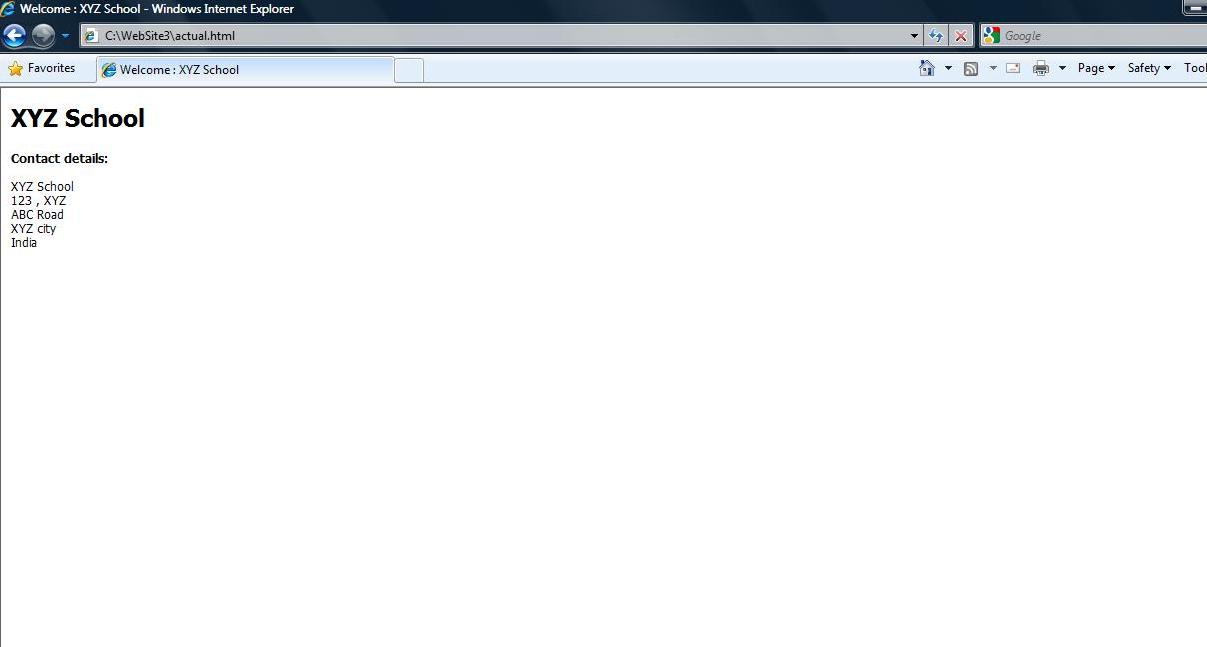
Step 4 : Run the above code .

This creates html in the location "C:\WebSite3\actual.html" . Please see the html created below :


XML Tutorial : Introduction to XML

XML stands for EXtensible Markup Language

XML Document below :
 <ORDER>
<NUM> PO-1234 </NUM>
<CUSTID> SAM </CUSTD>
<ITEM> COMPUTER </ITEM>
<QUANTITY> 5 </QUANTITY>
<PRICE> 138 </PRICE>
</ORDER>

Components of an XML Document :


Elements

  1. Each element has a beginning and ending tag . <TAG_NAME>...</TAG_NAME>
  2. Elements can be empty (<TAG_NAME />)

Attributes

  1. Describes an element; e.g. data type, data range, etc.
  2. Can only appear on beginning tag
Processing instructions
  1. Encoding specification (Unicode by default)
  2. Namespace declaration
  3. Schema declaration

Rules of Well Formed XML

  1. XML is case-sensitive
  2. There must be one, and only one, root element
  3. Sub-elements must be properly nested
  4. A tag must end within the tag in which it was started
  5. Attributes are optional
  6. Defined by an optional schema
  7. Attribute values must be enclosed in “” or ‘’
  8. Processing instructions are optional

Labels

.NET Framework Interview Questions (7) .NET Interview Questions (10) .NET Remoting Interview Questions (1) ADO.NET and BLOB Error (1) ADO.NET Interview Questions (4) Agile Articles (9) AJAX Articles (5) AJAX Interview Questions (11) Algorithms (2) Analytics Articles (2) Analytics Interview Questions (3) Android FAQs - Part 1 (2) Articles (13) ASP.NET Articles (24) ASP.NET Error and Resolution (4) ASP.NET Interview Questions (23) ASP.NET Tutorial (8) AWS Interview Questions (16) Business Analyst Interview Questions (1) Cloud Computing Interview Questions (16) CSharp Articles (17) CSharp Interview Questions (32) CSharp Tutorial (17) Data Analysis (2) Data Structure (1) Design Pattern Articles (5) DevOps Tutorial (1) Digital Marketing Interview Questions (1) Download Templates (1) Error Resolution (6) Excel Articles (9) Excel Macros (1) Excel Tips and Tricks (10) HTML5 Interview Questions (3) HTML5 Tutorial (3) Interview Preparation (2) Interview Questions (24) Introduction to Business Analytics (10) Introduction to Python (7) Introduction to R Programming (23) JAVA Articles (6) Java Tutorial (5) LINQ Articles (4) LINQ Interview Questions (2) LINQ Tutorial (3) Microservices Interview Questions (1) MVCInterviewQuestions (2) OOPs Interview Questions (4) Oracle 9i Tutorial (14) Oracle Articles (2) Oracle Interview Questions (15) Outlook Error (1) PHP Interview Questions (3) PHP Tutorial (3) Product Management (12) Product Management Interview Questions (14) Product Owner Interview Questions (2) Program Management (5) Project Management (13) Project Management Articles (34) Project Management Interview Questions (25) Quiz (1) RallyDev Help (1) Scrum Master Interview Questions (11) Selenium Tutorial (1) Sharepoint Articles (1) SQL Interview Questions (23) SQL Server Articles (20) SSIS Interview Questions (6) SSRS Interview Questions (1) Technical Program Management (12) Technical Program Management - Interview Questions (24) TechnicalProgramManagement (5) Threading Interview Questions (2) Tutorial (8) UML Articles (3) UML Interview Questions (2) Unix (3) UNIX Tutorial (3) WCF Articles (20) WCF Interview Questions (9) WCF Quiz (2) WCF Tutorial (16) Web Service Articles (5) Web Service Interview Questions (3) Window Azure (1) XML Articles (6) XML Interview Questions (3) XML Tutorial (3)